Let local AI generate them from the video
Wave Subs recognizes the dialogue in a video, generates SRT / ASS subtitles, and translates them into your language. Everything runs on your own computer — no internet needed, completely free.
Fully open source·Completely free·No in-app purchases
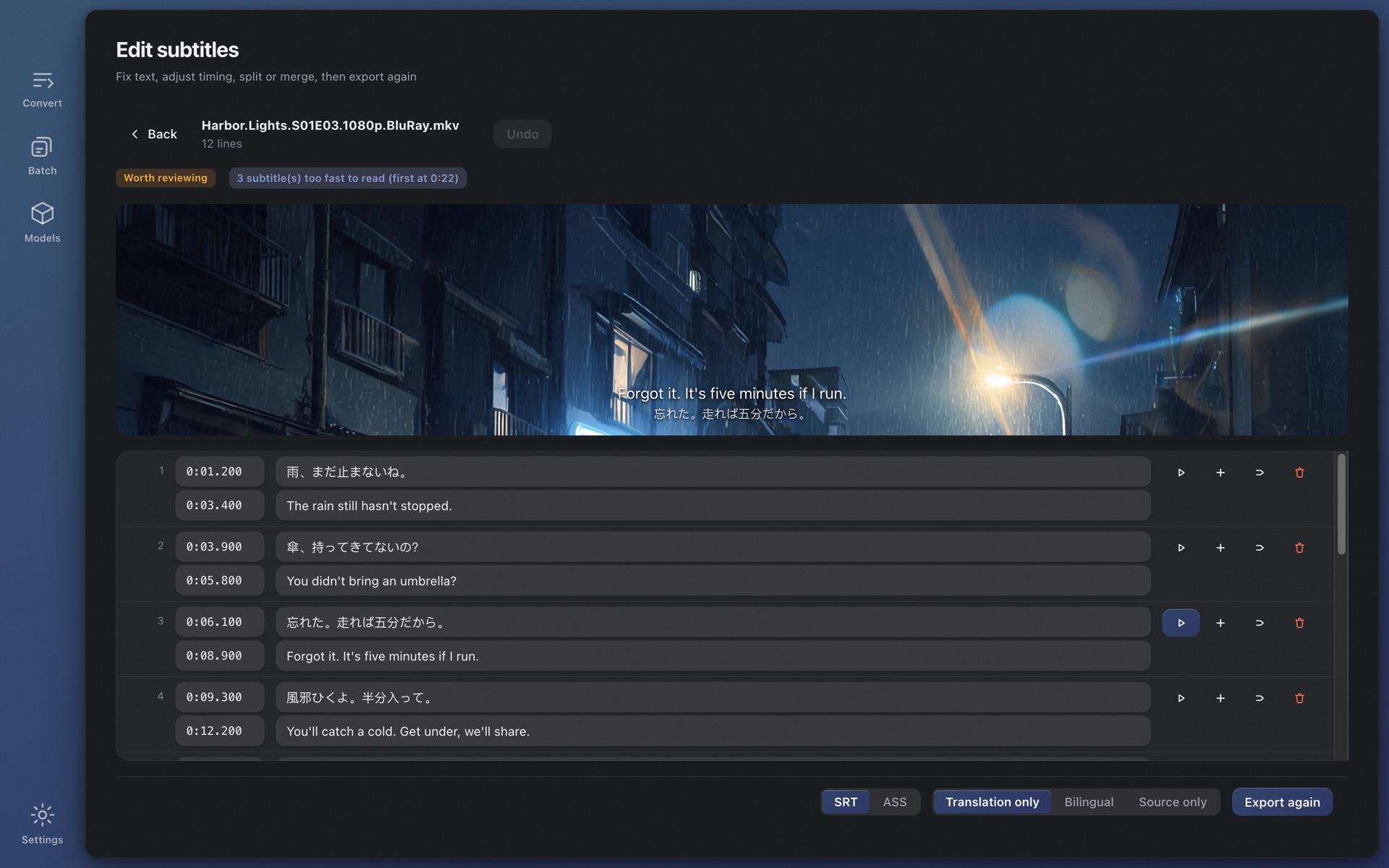
The editor: fix text, adjust timing, click any line to hear it
No subtitle sites to search, no video to upload, no account to create.
MKV, MP4, MOV, TS — all fine. If the file already has an embedded subtitle track, it is detected and used directly.
whisper.cpp recognizes the dialogue on your machine with automatic language detection; timing is refined to when lines are actually spoken, tuned against the official subtitles of six full-length films.
Translated into your language, exported as SRT or ASS next to the video — any player reads it. A quality verdict tells you where to take a look.
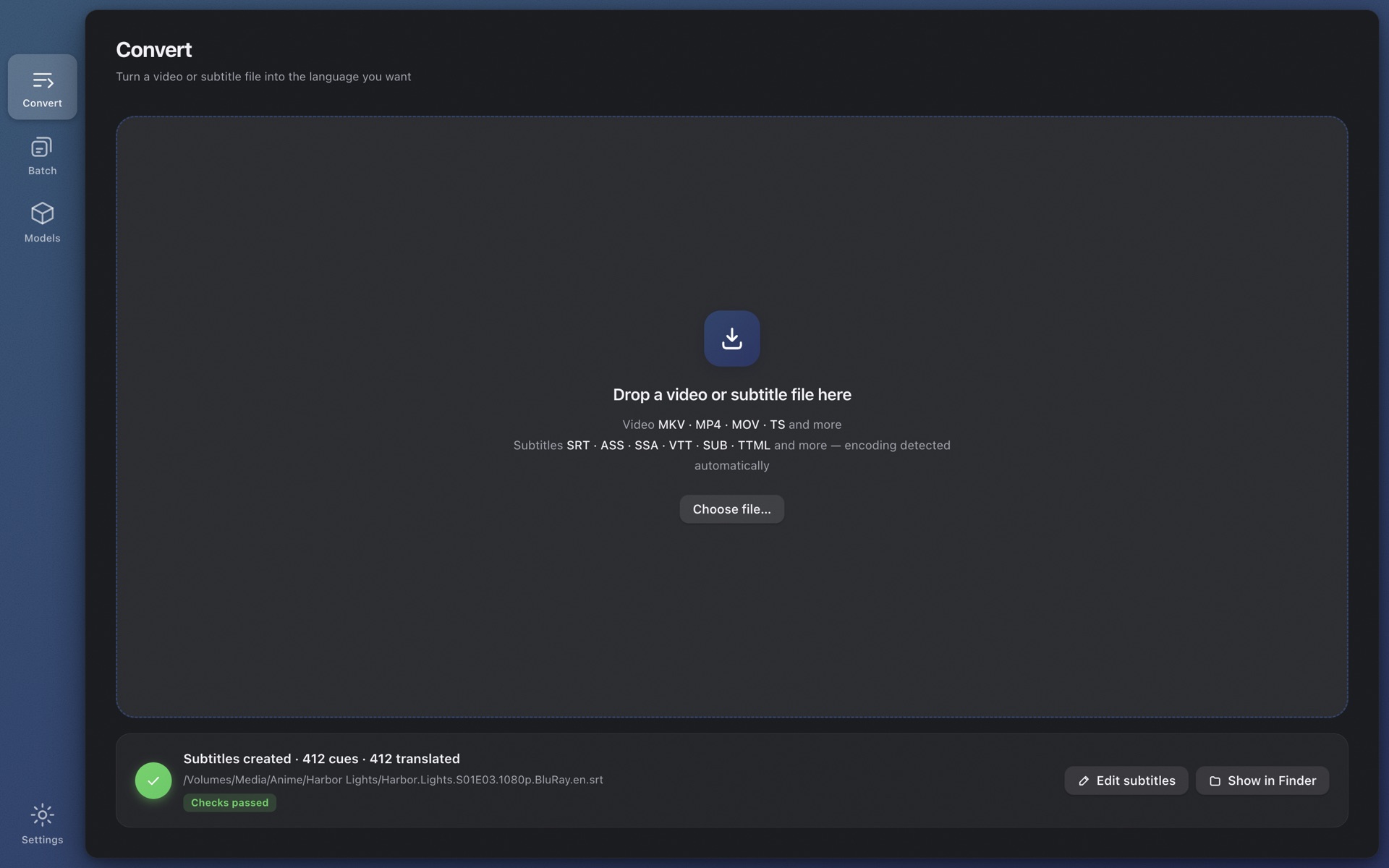
Translated into your language, exported as SRT or ASS next to the video — any player reads it. A quality verdict tells you where to take a look.
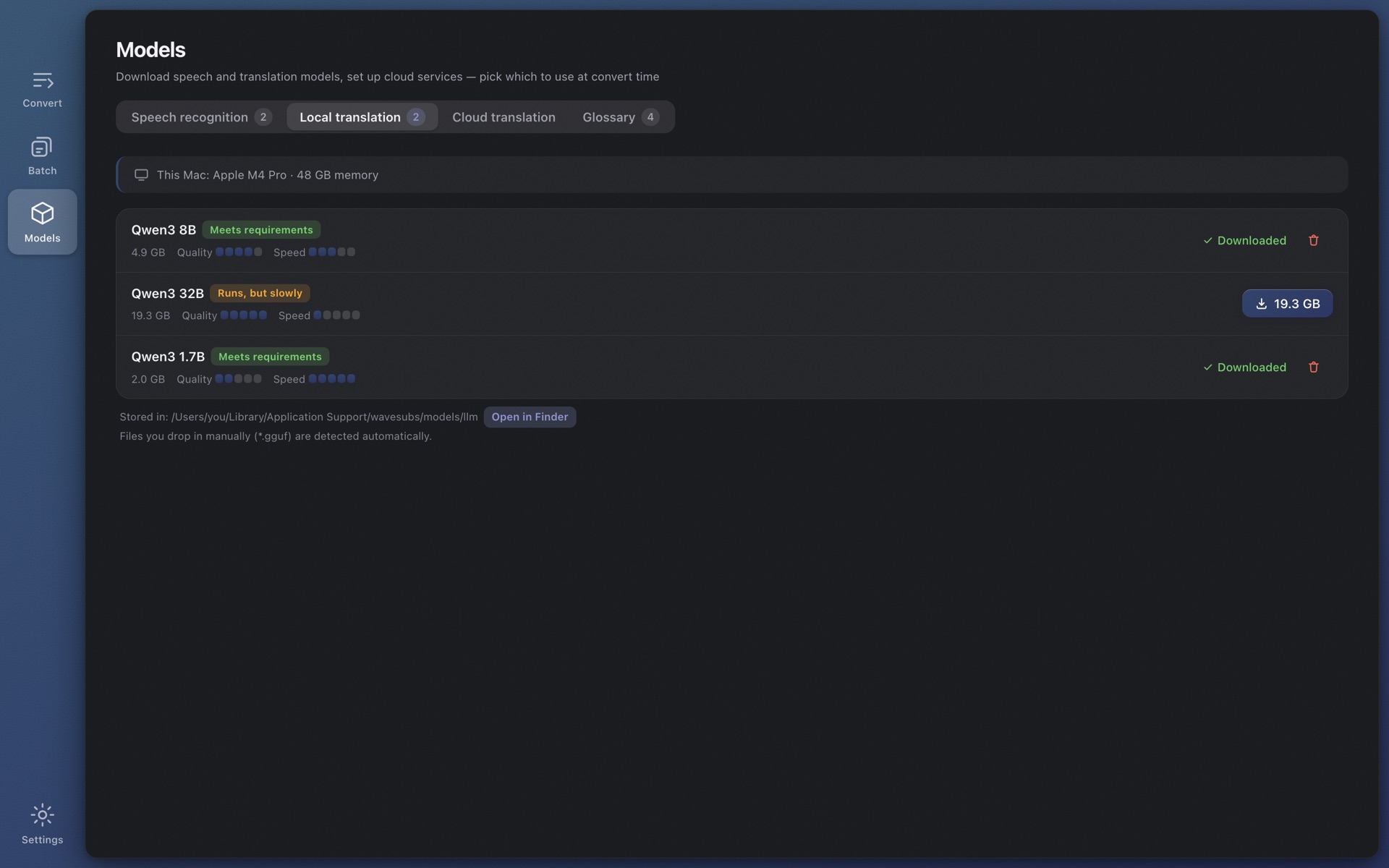
29 target languages: Chinese (Simplified and Traditional), English, Japanese, Korean, French, German, Spanish, Portuguese, Russian, Thai, Vietnamese, Indonesian, Malay and more. A locally running Qwen3 model by default — free and offline — or any OpenAI-compatible API.
Fix text, adjust timing, insert, delete, merge, undo, autosave. Click any line to hear exactly how it was said — even HEVC or DTS files a browser can't play, thanks to the bundled ffmpeg. Quality findings are clickable.
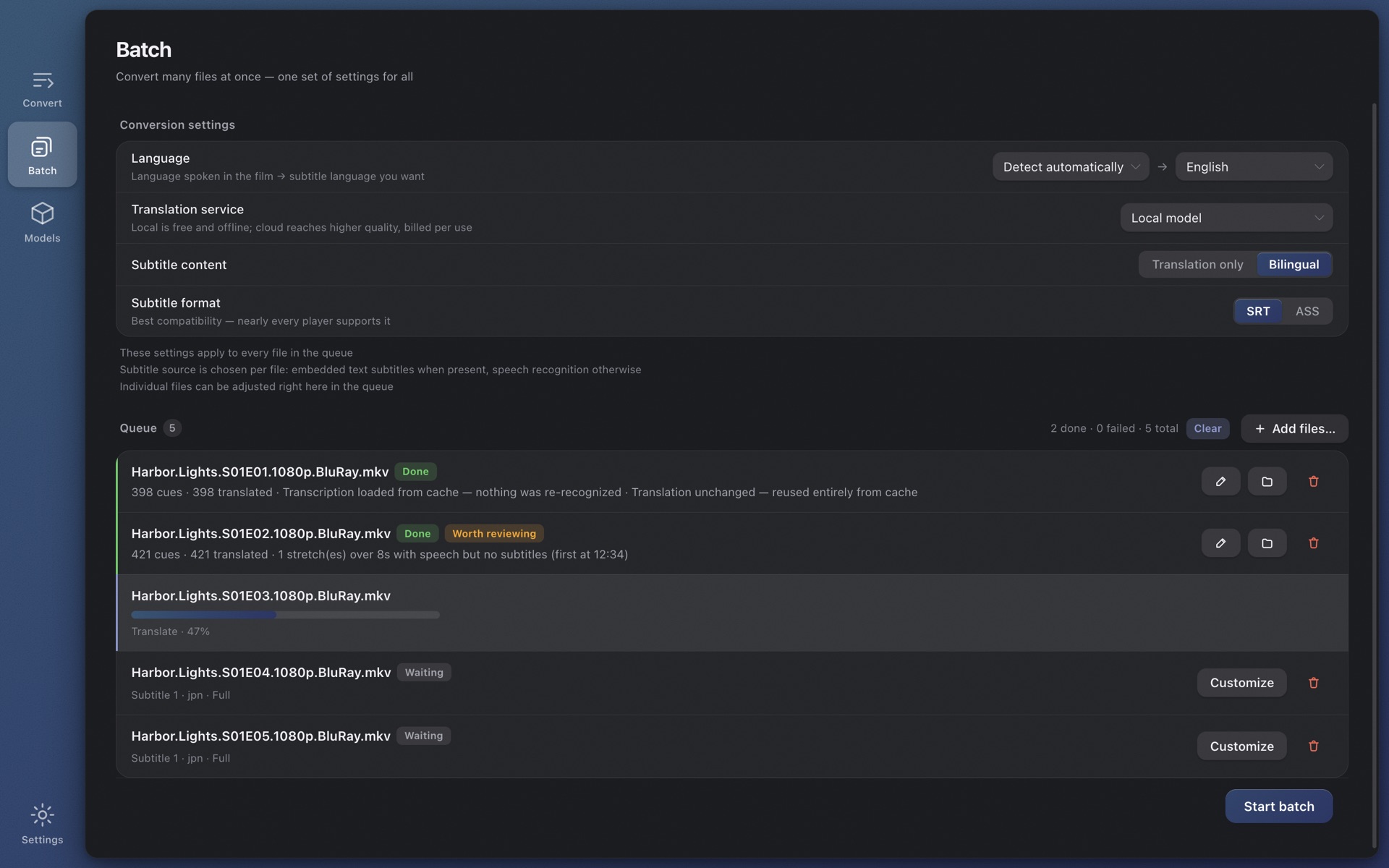
Drop in a folder. Every file follows the shared settings; override the subtitle track, audio track or engine only where needed. Each finished row carries its quality verdict.
Online subtitle tools ask you to upload the whole film. Wave Subs sends nothing anywhere.
Models download in one click inside the app, which labels each one fit / usable / too heavy for the memory in your machine. The same rules, as a table:
| Model | Download | RAM in use | Quality | Speed | Mac: recommended RAM | Windows PC: recommended RAM |
|---|---|---|---|---|---|---|
| Tiny | 75 MB | 0.5 GB | ●○○○○ | ●●●●● | 8 GB | 16 GB |
| Base | 142 MB | 0.7 GB | ●●○○○ | ●●●●● | 8 GB | 16 GB |
| Small | 466 MB | 1.2 GB | ●●●○○ | ●●●●○ | 8 GB | 16 GB |
| Medium | 1.5 GB | 2.6 GB | ●●●●○ | ●●○○○ | 16 GB | 24 GB |
| Large v3 Turbo | 1.6 GB | 2.2 GB | ●●●●◐ | ●●●●○ | 16 GB | 24 GB |
| Large v3 | 3.0 GB | 4.5 GB | ●●●●● | ●○○○○ | 16 GB | 24 GB |
| Model | Download | RAM in use | Quality | Speed | Mac: recommended RAM | Windows PC: recommended RAM |
|---|---|---|---|---|---|---|
| Qwen3 1.7B | 1.8 GB | 2.5 GB | ●●○○○ | ●●●●● | 16 GB | 24 GB |
| Qwen3 4B | 2.4 GB | 3.5 GB | ●●●○○ | ●●●●○ | 16 GB | 24 GB |
| Qwen3 8B | 4.9 GB | 6 GB | ●●●●○ | ●●●○○ | 16 GB | 24 GB |
| Qwen3 14B | 9.0 GB | 10.5 GB | ●●●●◐ | ●●○○○ | 24 GB | 32 GB |
| Qwen3 32B | 19.7 GB | 22 GB | ●●●●● | ●○○○○ | 32 GB | 48 GB |
| Your machine | Recognition | Translation | Notes |
|---|---|---|---|
| Mac 8 GB | Small or Large v3 Turbo | Qwen3 1.7B | Works; Turbo runs on 8 GB but keep other apps closed |
| Mac 16 GB | Large v3 Turbo | Qwen3 8B | The default — the balance of quality and speed |
| Mac 32 GB | Large v3 | Qwen3 14B | Best recognition, more accurate translation |
| Mac 48 GB or more | Large v3 | Qwen3 32B | Best translation quality, slower |
| Windows PC 16 GB | Large v3 Turbo | Qwen3 4B | CPU only — the same model typically takes several times longer than on Apple Silicon |
| Windows PC 32 GB | Large v3 Turbo | Qwen3 8B | Larger models run; allow extra time |
Version 1.0.1. ffmpeg and whisper.cpp are bundled — install and go, nothing else to set up.
brew install --cask jason-jm/wavesubs/wavesubsscoop bucket add wavesubs https://github.com/jason-jm/scoop-wavesubs && scoop install wavesubsOn first launch you'll be guided to download a recognition model (no network needed after that). Open-source component licenses: THIRD-PARTY-LICENSES.
MKV, MP4, MOV, TS, AVI and other common formats; HEVC, DTS and TrueHD streams a browser can't play are fine too, because the bundled ffmpeg decodes everything. Audio-only files work as well.
Recognition covers the nearly 100 languages whisper supports, with automatic detection; there are 29 translation targets; the interface comes in 32 languages.
Recognition, alignment, translation, editing and export all run locally. Only two things touch the network: the one-time model download, and cloud translation if you choose to configure it.
Roughly 3–6 minutes with Large v3 Turbo on an M-series chip, plus a few more for local translation. Batch a whole season and let it run.
Recognition uses the whisper large family; timing is snapped to when lines are actually spoken using voice activity detection and loudness analysis, tuned against official subtitles of six full films. Every file gets a quality verdict.
Embedded text tracks are detected and preferred, skipping straight to translation — faster and more accurate than recognition. Image-based subtitles (PGS/VobSub) are the exception.
Not currently. Local recognition relies on Metal acceleration on Apple Silicon; on Intel it would be too slow to be useful.
The Windows build isn't code-signed yet, so SmartScreen warns about new programs. Click "More info → Run anyway"; checksums are on the GitHub Releases page.
Online tools make you upload the whole film, charge per minute and cap the length. Wave Subs uploads nothing, costs nothing and has no length limit — speed depends on your machine.